A redesigned website can look finished long before it is ready to replace the site your business already has.
The homepage is polished. The images are dramatic. The typography feels more current. Everyone reviewing the staging link agrees that the new version looks better.
Then the site launches—and the problems begin.
An old service URL no longer works. A contact form appears to submit but never reaches the business. Mobile visitors cannot use the primary call to action. Analytics records pageviews but not qualified inquiries. A social share pulls the old brand image. Search engines discover that the staging site's noindex instruction was never removed.
None of those failures are visible in a homepage screenshot.
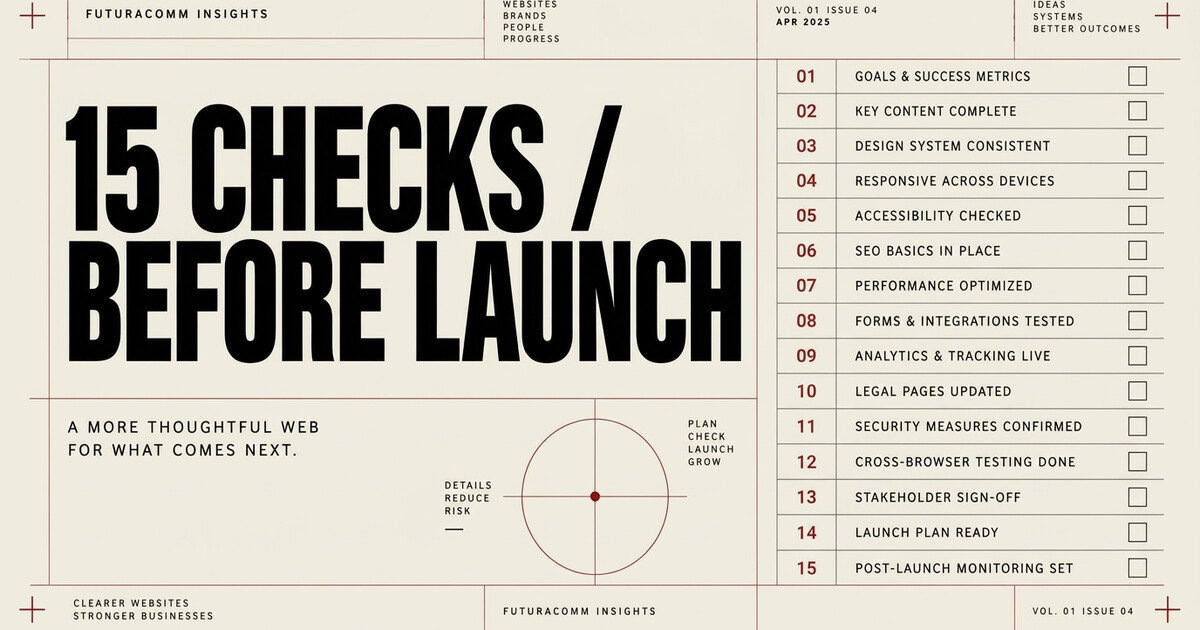
That is why a serious website redesign checklist must evaluate more than design. Before launch, the new site should protect or improve six connected systems:
- Positioning: Does the site accurately represent the business now?
- Discovery: Can people and search engines find the right pages?
- Trust: Does the site prove what it claims?
- Action: Can a qualified visitor take the next step without friction?
- Measurement: Will the business know what the site produces?
- Operations: Can the team own, maintain, and recover the site after launch?
Use the following 15 checks before a redesigned website goes live.
1. Define the business outcome before approving the design
The first question is not, “Does the new site look better?”
It is, “What must this site help the business accomplish?”
For one company, the answer may be qualified estimate requests. For another, it may be booked consultations, direct purchases, distributor applications, press credibility, recruiting, investor confidence, or several distinct paths for different audiences.
Write down the primary outcome and the meaningful secondary outcomes. Then identify which pages, messages, and actions support them.
A redesign without a commercial definition of success can become an expensive visual exercise. The site may be attractive but impossible to evaluate because nobody agreed on what it was supposed to do.
2. Preserve a baseline from the existing website
Before replacing the old site, document what it already earns.
Save the information you will need for a fair pre- and post-launch comparison:
- Organic traffic and search queries
- Pages receiving meaningful search visits
- Pages with valuable inbound links
- Calls, forms, bookings, purchases, or other conversions
- Paid-campaign landing pages
- Conversion paths and thank-you pages
- Current Core Web Vitals and mobile behavior
- Top referral sources
- Existing titles and descriptions on important pages
The point is not to preserve every weak page merely because it exists. It is to avoid deleting value you did not know you had—and to make the redesign measurable after launch.
3. Inventory every current URL and decide its future
Create a complete URL inventory before the site structure changes.
Every meaningful existing URL needs one of four decisions:
- Keep the same URL and improve the page
- Move it to a new, closely related URL
- Consolidate it into a stronger relevant page
- Retire it because it no longer serves the business or the user
If a URL changes, map the old address directly to the most relevant new one. Do not send every retired page to the homepage simply because that is easy.
Google recommends permanent server-side redirects such as 301 or 308 for permanent moves and advises avoiding redirect chains. Its site-move guidance also recommends mapping old and new URLs and testing the redirects before and after launch. (Google Search Central: site moves)
This is one of the quietest redesign risks: the page appears to work for new visitors while old campaign links, bookmarks, citations, and search results lead somewhere irrelevant—or nowhere at all.
4. Build the new architecture around real services and buyer questions
A homepage cannot carry the entire search and sales burden of an established business.
The redesign should give important services, locations, audiences, or use cases a clear home when each deserves its own decision path. That does not mean creating thin pages for every keyword variation. It means giving meaningful topics enough space to answer the visitor's question and support a real next step.
Google's Search Essentials recommends using the words people use to find the content in prominent places such as titles, main headings, alt text, and link text. It also emphasizes crawlable links so search engines can discover important pages. (Google Search Essentials)
Before launch, ask:
- Can a visitor find the specific service from the navigation or a relevant internal path?
- Does the page answer the questions attached to that service?
- Does it explain who or where the offer is for?
- Does it have a distinct purpose, or is it another version of generic homepage copy?
- Can search engines reach it through ordinary links?
The sitemap should reflect how the business actually sells—not merely how the organization is arranged internally.
5. Make the first screen answer the buying question
The first visible screen should orient a qualified visitor quickly.
It does not need to explain everything. It should make four things clear:
- What the business does
- Who or where it serves
- Why the offer is credible or meaningfully different
- What the visitor should do next
Vague language can look sophisticated while making the visitor work too hard. “Transforming possibilities” may sound polished, but it does not tell a buyer whether the company can solve the problem that brought them to the page.
Strong positioning and strong design are not separate layers. The design should make the most commercially important truth easier to see.
6. Verify every claim and every piece of proof
A redesign often introduces new case studies, client logos, statistics, testimonials, press references, partner logos, and “as seen in” sections. Treat each one as a factual claim.
Before launch, verify:
- The relationship is real and described accurately
- The result is documented and properly bounded
- The testimonial is reproduced faithfully and attributed
- The logo or image is approved for public use
- A concept is clearly labeled as a concept
- A press logo represents actual coverage, not a vague association
- Platform or partner branding does not imply an endorsement that does not exist
The best trust architecture is not the largest pile of logos. It is the most relevant proof presented with the least ambiguity.
7. Give every important page one clear primary action
Every commercially important page should answer: What is the most useful next step for this visitor?
That action may be:
- Request an estimate
- Book a consultation
- Check availability
- Call or text
- Buy the product
- Submit a referral
- Start a project
- Read the case study before deciding
The wording should tell the visitor what they are doing, not hide the next step behind “Submit.” Secondary actions can remain available, but they should not compete equally with the primary path.
Then check whether the action matches the commitment level. A long questionnaire may be appropriate after a prospect decides to begin a complex project. It may be excessive for someone who only needs to ask whether the company handles a particular type of work.
8. Submit every form—do not merely inspect it
A form is not working because it looks complete.
Test every route like a real prospect:
- Submit a valid inquiry
- Try to advance with required fields empty
- Enter an invalid email address
- Test error messages and focus behavior
- Confirm the success state
- Confirm the message reaches the correct inbox or CRM
- Verify notifications and autoresponders
- Test duplicate submissions
- Test the form on a phone with the on-screen keyboard open
- Confirm spam protection does not block ordinary users
The W3C Web Accessibility Initiative recommends explicit labels for form controls and clear identification of required fields. Its forms guidance also notes that users generally prefer shorter forms that ask only for information required to complete the process. (W3C: form labels; W3C: forms tutorial)
Accessibility here is not an abstract compliance exercise. Labels, instructions, useful errors, and sensible field requirements help more people complete the action correctly.
9. Test the mobile buying path on real devices
Do not approve the mobile site by dragging a desktop browser narrower.
Use real phones and test at least the major device widths represented in the business's audience. Check portrait and landscape where the experience warrants it.
Look for:
- Headlines that wrap into unreadable shapes
- Images cropped around the wrong subject
- Buttons hidden by sticky navigation or chat controls
- Tap targets that are too close together
- Forms covered by the keyboard
- Menus that trap focus or fail to close
- Horizontal scrolling
- Important proof pushed too far down the page
- Phone numbers that are not tappable
- Layout movement as fonts and images load
Google uses the mobile version of a site's content for indexing and ranking under mobile-first indexing, so important content, metadata, structured data, and links should remain present and consistent on mobile. (Google Search Central: mobile-first indexing)
The mobile version is not the smaller version of the site. For many prospects, it is the site.
10. Measure performance with both lab and field data
Visual polish can conceal a heavy page.
Large hero images, autoplay video, third-party scripts, animation libraries, custom fonts, trackers, and widgets can all change how quickly the site becomes useful.
Current Core Web Vitals guidance defines a good experience as:
- Largest Contentful Paint (LCP) of 2.5 seconds or less
- Interaction to Next Paint (INP) of 200 milliseconds or less
- Cumulative Layout Shift (CLS) of 0.1 or less
Those thresholds should be evaluated at the 75th percentile of page loads, separated by mobile and desktop. (web.dev: Web Vitals)
Lab tools are valuable before launch because field data does not yet exist for the new experience. After launch, field data becomes essential because it reflects real devices, networks, and visitors. Google explicitly distinguishes controlled lab measurements from real-user field data; one should not be treated as a substitute for the other. (web.dev: lab and field data)
Performance scores are diagnostics—not a guarantee of rankings or sales. The practical test remains: can the visitor see, understand, and act without waiting or fighting the interface?
11. Verify accessibility beyond automated scoring
Automated tools can catch missing alt text, contrast problems, unlabeled fields, and some structural errors. They cannot tell you whether the complete experience makes sense.
Perform keyboard-only navigation and check:
- Visible focus states
- Logical focus order
- Skip navigation where appropriate
- Menu and modal behavior
- Descriptive link and button names
- Meaningful image alternatives
- Heading hierarchy
- Form labels, instructions, and errors
- Captions or transcripts for meaningful video and audio
- Text readability at zoomed sizes
Do not claim that a site is “fully ADA compliant” because an automated scan produced a high score. Record what was tested, correct the failures, and treat accessibility as ongoing product quality.
12. Test analytics and attribution through the completed action
The new site should not merely load the analytics tag. It should record the actions the business actually values.
Before launch, verify events for relevant outcomes such as:
- Form completions
- Confirmed bookings
- Purchases
- Phone-number taps
- Click-to-text actions
- Email clicks
- Downloads
- Qualified application starts or completions
Walk through the complete action and confirm that the event reaches the reporting system with the expected parameters. Google Analytics recommends using Realtime and DebugView to verify that event data is being collected. (Google Analytics: confirm data collection)
Also preserve campaign attribution. A redesign can change button identifiers, forms, thank-you URLs, or routing in ways that quietly break existing tracking rules.
If the business cannot distinguish a visitor from a qualified action, post-launch optimization begins with guesswork.
13. Inspect search and social metadata page by page
Before launch, review the pages that matter individually—not only the homepage.
Confirm:
- A unique, accurate page title
- A useful meta description
- One clear main heading
- The correct canonical URL
- Accurate structured data where applicable
- Descriptive image alt text
- A share title and description
- A current share image
- The correct permanent URL
The Open Graph protocol uses properties including og:title, og:type, og:image, and og:url to represent a page when it is shared. (Open Graph protocol)
Paste important URLs into the preview tools for the platforms that matter. A stale share image can carry an old name, an outdated offer, or a relationship the company no longer wants to imply—even when the visible webpage is correct.
14. Complete the production search controls
Staging sites are often protected from indexing during development. That protection must not accidentally follow the site into production.
At launch, verify:
- Important pages are not carrying a
noindexdirective - Crawlable resources are not unintentionally blocked
- Canonicals point to the final production URLs
- The XML sitemap contains the intended canonical URLs
robots.txtreferences the correct sitemap where appropriate- Search Console ownership remains available
- The sitemap is submitted or resubmitted
- Priority pages return the correct HTTP status
Google advises removing temporary crawl or noindex blocks when a new site is ready to move. It also explains that robots.txt is primarily a crawler-management tool and should not be treated as a reliable way to remove a webpage from search results. (Google: changing hosting; Google: robots.txt guide)
Google can often discover a properly linked site on its own, but submitting a sitemap through Search Console provides processing visibility and may help discovery. (Google: build and submit a sitemap)
15. Build a launch-day and post-launch monitoring plan
“Publish” is not the final step. It is the point at which the new system begins meeting real visitors.
Assign owners for the first hours, days, and weeks after launch.
Launch day
- Crawl the production site
- Test high-value redirects
- Submit every primary form
- Verify phone and booking paths
- Confirm analytics events
- Inspect titles, canonicals, and indexing directives
- Test social-sharing previews
- Check the site on real mobile devices
- Confirm backups and rollback access
First 72 hours
- Watch server errors and broken links
- Monitor lead delivery
- Review conversion events
- Inspect Search Console coverage and sitemap processing
- Check campaign destinations
- Confirm that important old URLs resolve correctly
First 30 days
- Compare traffic and qualified actions with the baseline
- Review search queries and landing pages
- Inspect real-user performance data as it becomes available
- Improve pages creating friction
- Add answers based on actual prospect questions
- Separate temporary launch volatility from genuine structural problems
The goal is not to declare the redesign perfect on day one. It is to make the launch observable, reversible where possible, and capable of improving from real evidence.
What Orbit Services demonstrates about a complete launch
FuturaComm did not treat Orbit Services' redesign as a new homepage in isolation.
The work included service-specific landing pages, city-specific search pages, a custom inquiry flow, mobile call and text paths, campaign attribution, strategic search content, and technical and on-page SEO structure.
Orbit recorded three booked jobs from the first seven Google Ads clicks after the new site launched.
Seven clicks is not a durable conversion sample, and the result should not be converted into a forecast or long-term conversion rate. It is a bounded early result.
What it shows is that the launch connected the systems around the design: a targeted visitor could reach a relevant page, understand the offer, find a usable path, and become booked work.
That is a more useful definition of “finished” than an approved screenshot.
The website redesign approval questions an owner should ask
Before approving launch, ask the team or agency responsible for the redesign:
- What business outcome is each important page designed to support?
- Which existing URLs and search assets are being preserved?
- Where is the one-to-one redirect map?
- Which claims, logos, testimonials, and results have been verified?
- What happens when a visitor submits each form?
- Which conversion events have been tested in the reporting system?
- How does the mobile experience differ from desktop where it needs to?
- What accessibility checks were completed manually?
- What will appear when each important page is shared?
- Who is monitoring the site after launch, and what is the rollback plan?
- Who owns the domain, analytics, code, content, and source assets?
- What will be improved after real visitor data arrives?
If the answers are vague, the site may be visually finished but operationally incomplete.
A redesign should leave the business with a better system
The standard for a redesigned website is not novelty. It is alignment.
The site should reflect the company that exists now, preserve the search value worth keeping, give important services room to be found, support a credible buying decision, make action easier, and produce evidence the business can use to improve.
FuturaComm's Web Studio combines strategy, positioning, custom design, professional copy, responsive development, service and location architecture, inquiry flows, analytics, attribution, and launch support.
There is no upfront payment. Nothing is due until you love the completed website and are ready to launch.
Start your website project and let us evaluate what the current site should preserve, what it should replace, and what the new system needs to accomplish.
Frequently asked questions
How do I know whether a website redesign is ready to launch?
Confirm more than appearance. The positioning should be accurate; important URLs and search value should be preserved; forms and mobile actions should work; claims should be verified; analytics should record meaningful outcomes; metadata should be correct; and the team should have a post-launch monitoring and recovery plan.
Can a website redesign hurt SEO?
Yes, particularly when valuable URLs change without relevant permanent redirects, important content disappears, internal links break, canonicals or indexing directives are wrong, or the new mobile experience contains less useful content. A documented URL map, search baseline, technical crawl, and post-launch monitoring plan reduce that risk.
Should every old URL redirect to the new homepage?
No. Changed URLs should generally map to the closest relevant new destination. Sending unrelated retired pages to the homepage creates a poor user experience and does not preserve the meaning of the original page.
What should be tested after a website launches?
Retest forms, calls, booking paths, analytics events, redirects, mobile layouts, social previews, status codes, canonicals, indexing controls, sitemap processing, and campaign links. Then compare qualified actions and search performance with the pre-launch baseline.